Download barc.py, or find it on GitHub
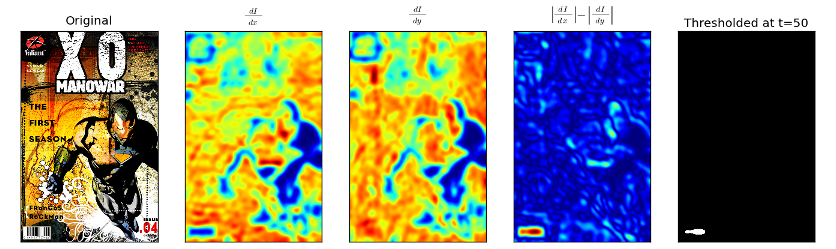
This script implements a fairly simple algorithm for isolating the barcode from a larger image.
- Grayscale the image
- Take the gradient, store two cartesian components as separate images
- Gaussian blur each component
- Take the difference of the magnitudes of the two images
- Threshold the resulting difference image
- Find the edges of the thresholded result, crop the original using the corner found
Documentation
def find_barcode(fname, s=15, t=50, disp=True, verbose=False):
This function takes in a file name (jpg, png, bmp, gif) and attempts to locate a barcode.
Keyword arguments:
fname: A file name presented as a string.
s: A sigma value (radius) for a Gaussian blur filter used to remove excess detail in the original image. Defaults to 15.
t: The threshold cutoff to use when isolate the barcode. Defaults to 50.
disp: True causes the function to display the results using matplotlib.
verbose: True causes extra text output.
This function takes in a file name (jpg, png, bmp, gif) and attempts to locate a barcode.
Keyword arguments:
fname: A file name presented as a string.
s: A sigma value (radius) for a Gaussian blur filter used to remove excess detail in the original image. Defaults to 15.
t: The threshold cutoff to use when isolate the barcode. Defaults to 50.
disp: True causes the function to display the results using matplotlib.
verbose: True causes extra text output.
Example